Java Easy Snippet - VS Code Shortcuts
Java requires a lot of repetitive boilerplate for basic inputs and collections. This VS Code extension adds quick shortcuts like jmain and jscan to speed up coding.
https://marketplace.visualstudio.com/items?itemName=BamaCharanChhandogi.JavaSnippet
The Problem
Java is notoriously verbose. When practicing data structures, algorithms, or preparing for technical interviews, typing out public static void main(String[] args), Scanner declarations, ArrayList<Integer>, and loops over and over again wastes time and breaks concentration during timed challenges.
How It Solves It
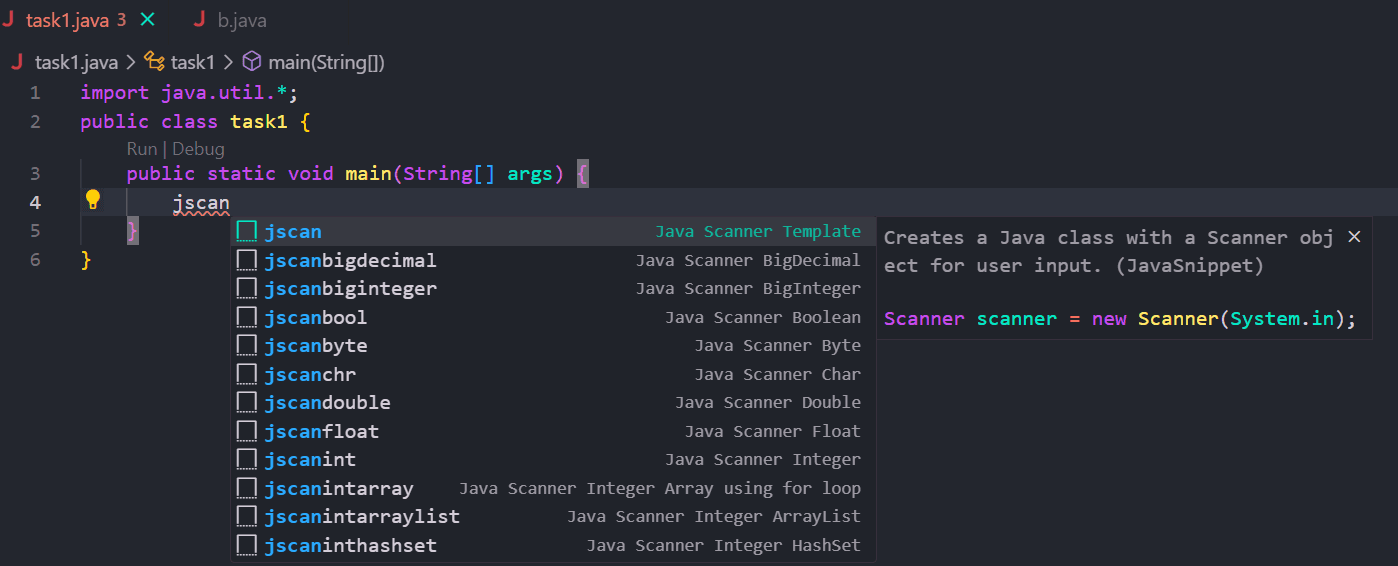
Java Easy Snippet adds 60+ intuitive shortcuts inside VS Code. You just type a short prefix and press Tab:
jmainexpands into a complete runnable main class.jscancreates a fast Scanner input pattern.jalsets up an ArrayList with tab stops ready for your data type.jhmsets up a HashMap.
How It's Built
- VS Code Snippet Grammar: Uses native snippet placeholders so you can tab between variable names and types smoothly.
- Java-Only Scoping: Configured to only trigger inside
.javafiles so it never gets in the way when editing other file types.
What It Means
Crossed 500+ downloads on the marketplace, helping students and engineers practice coding problems faster without typing out boring boilerplate.